The Shopify wishlist app
built for Mailchimp.
Looking for a Shopify wishlist app with a real Mailchimp integration? WishList Ninja keeps live, real-time wishlist merge fields on every Mailchimp contact — so your segments, automations and campaigns finally know what customers actually want.
Merge fields that stay true.
Five wishlist merge fields on every contact, refreshed live and kept accurate in real time. WishList Ninja creates the fields in your audience automatically — paste your API key and you're done. Segment on real intent: "WL_VALUE over 150 and WL_ACTIVE is YES" is a two-click audience segment. Read the docs →
Every wishlister, known.
Wishlists are account-backed — shoppers sign up to save, so every wishlist maps to a real contact in your audience. More store accounts, zero ghost data, no compliance headaches.
Send to wanting, not wondering.
Sale coming? Campaign to everyone with an active wishlist. Stock clearing? Target WL_PD = YES with "your saved items just dropped". Every send lands on declared intent instead of guesswork.
How do you connect a Shopify wishlist to Mailchimp?
Connecting a Shopify wishlist app to Mailchimp lets you trigger automated emails from wishlist activity. With WishList Ninja it's an API key and an Audience ID — no code:
- 1Install WishList Ninja
Add it free from the Shopify App Store and switch on the app embed in your theme editor — the wishlist goes live on your storefront in one click.
- 2Paste your Mailchimp API key + Audience ID
In Mailchimp: profile icon → Account & billing → Extras → API keys → Create A Key, and copy your Audience ID from Audience → Settings → Audience name and defaults. Paste both into the WishList Ninja dashboard and save.
- 3Merge fields appear automatically
WishList Ninja creates WL_COUNT, WL_VALUE, WL_ACTIVE, WL_PD and WL_BIS in your audience on the first sync. Segment on them, and trigger Customer Journeys from the wishlist events.
Build your Mailchimp flows
Seven wishlist triggers, one flow each — here’s the exact setup and the dynamic tags to drop into your emails.
- 1Create the journey
Mailchimp → Automations → Customer Journeys → Create. Name it.
- 2Set the starting point
Choose API & Integrations → Event API, then set the event name from the table below.
- 3Add a Send-email step
Add a Send email step after the trigger and design the email.
- 4Personalise
Use the merge fields below, plus conditional blocks to show sections only to active wishlisters.
- 5Turn it on
Switch the journey On.
The 7 triggers
| Wishlist trigger | Mailchimp event name |
|---|---|
| Added to Wishlist | added_to_wishlist |
| Price Drop & Sale | wishlist_price_drop |
| Low Stock | wishlist_low_stock |
| Back in Stock | wishlist_back_in_stock |
| Saved a Collection | wishlist_collection_saved |
| New Items in a Saved Collection | wishlist_collection_new_items |
Dynamic content for your emails
Mailchimp emails are kept generic and link the shopper to their wishlist (where they see exactly what changed). Personalise with these merge fields:
| Merge tag | Shows |
|---|---|
*|WL_URL|* | Link to the shopper’s wishlist — your main CTA |
*|FNAME|* | First name (subject + body) |
*|WL_COUNT|* · *|WL_VALUE|* · *|WL_CURR|* | Saved count, value, currency symbol |
*|WL_ACTIVE|* · *|WL_PD|* · *|WL_BIS|* | Active / price-drop / back-in-stock flags |
Link any button to *|WL_URL|* — e.g. “See your wishlist →”. It opens the shopper’s saved items so they see exactly what dropped or restocked.
*|IF:WL_ACTIVE=YES|* …your “saved items” block… *|ELSE:|* …a “start a wishlist” prompt… *|END:IF|*
Why generic? Mailchimp emails can’t reliably carry per-event product data, so we keep them simple and send shoppers to their wishlist. For per-product emails (image, price, exact item) inline, Klaviyo is the deeper integration.
The flow emails, built for you
Each email built in Mailchimp, with the copy & tags to recreate it.
*|WL_URL|* (“See your wishlist”).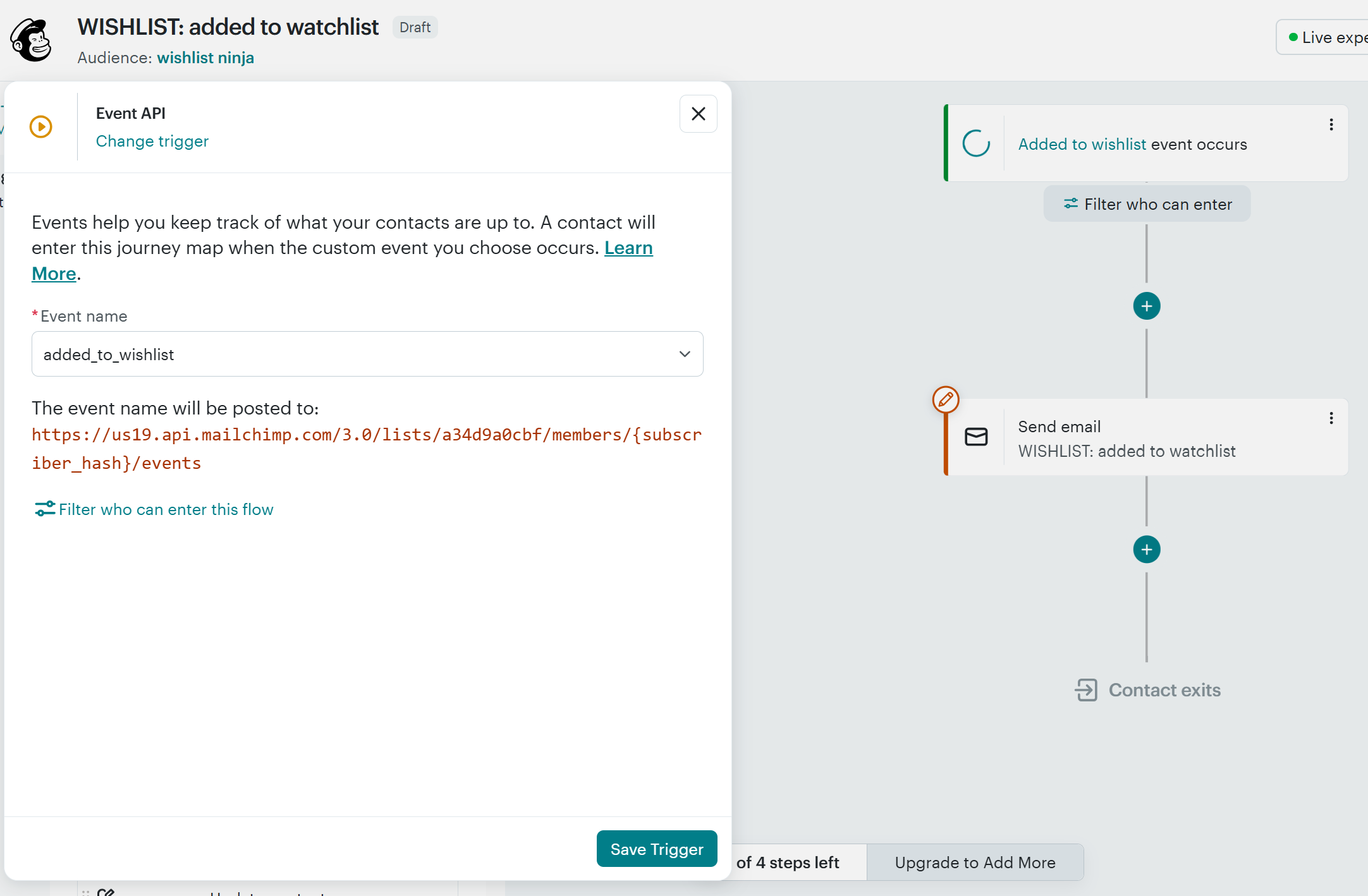
*|WL_URL|* (“See your wishlist”).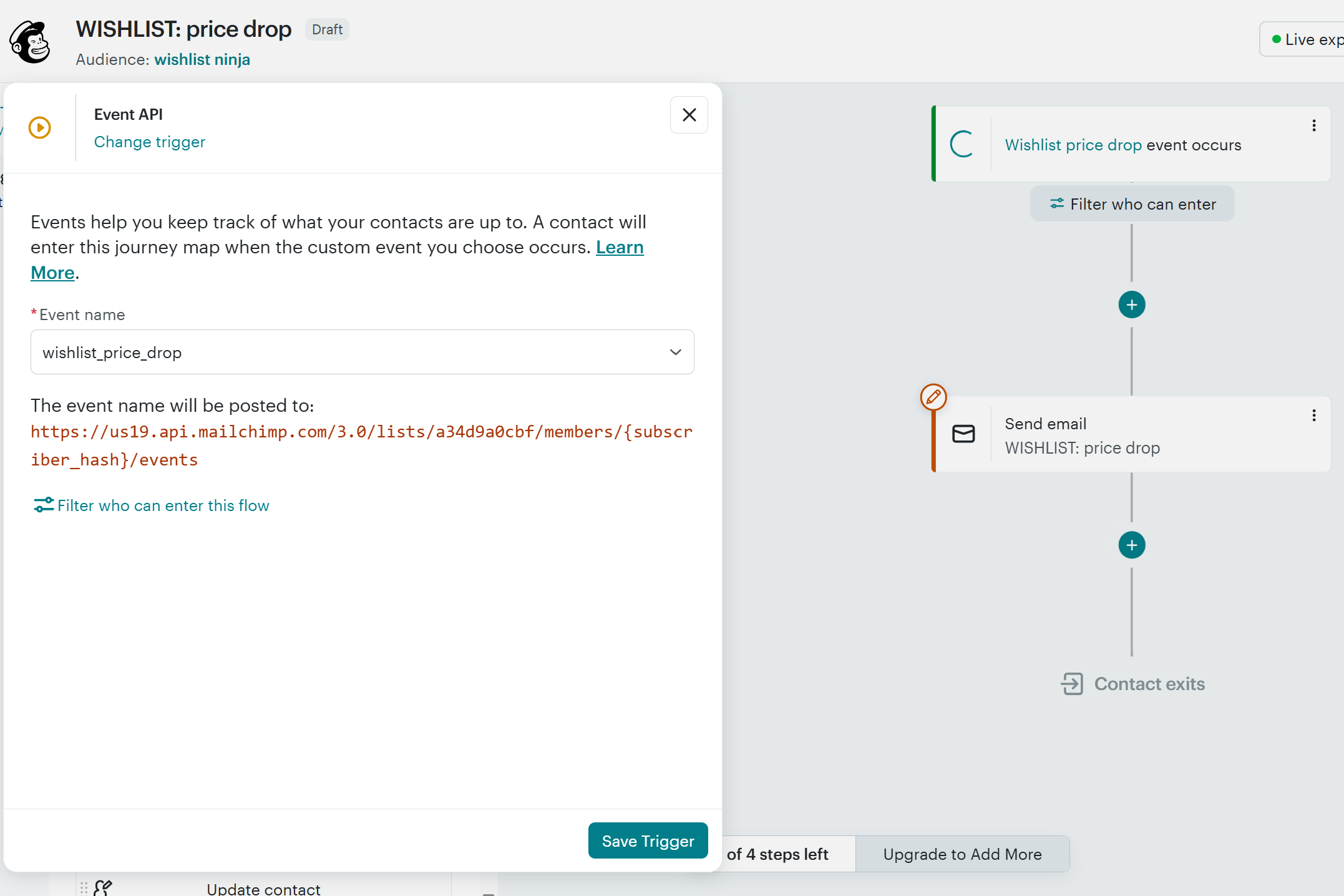
*|WL_URL|* (“See your wishlist”).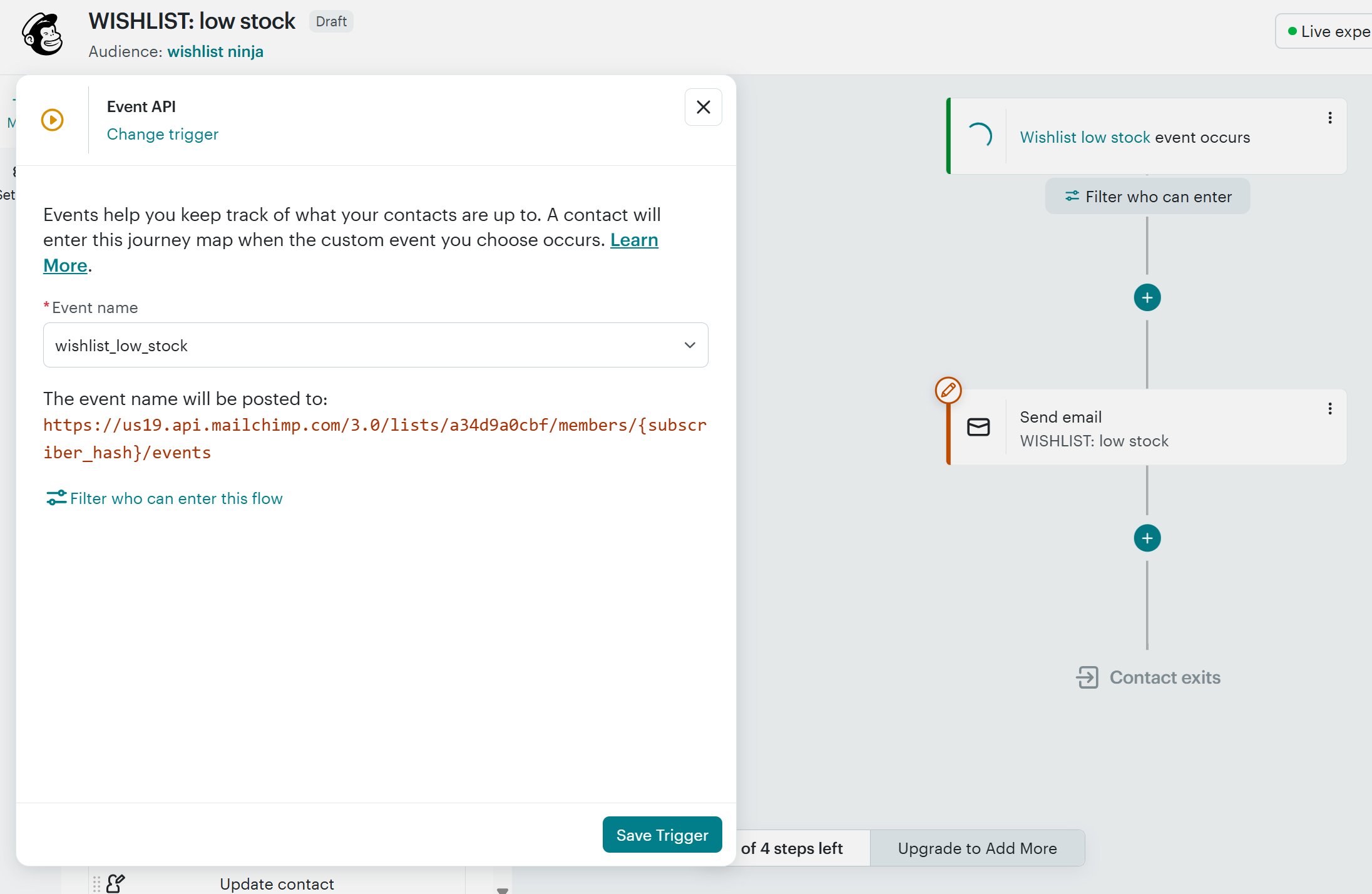
*|WL_URL|* (“See your wishlist”).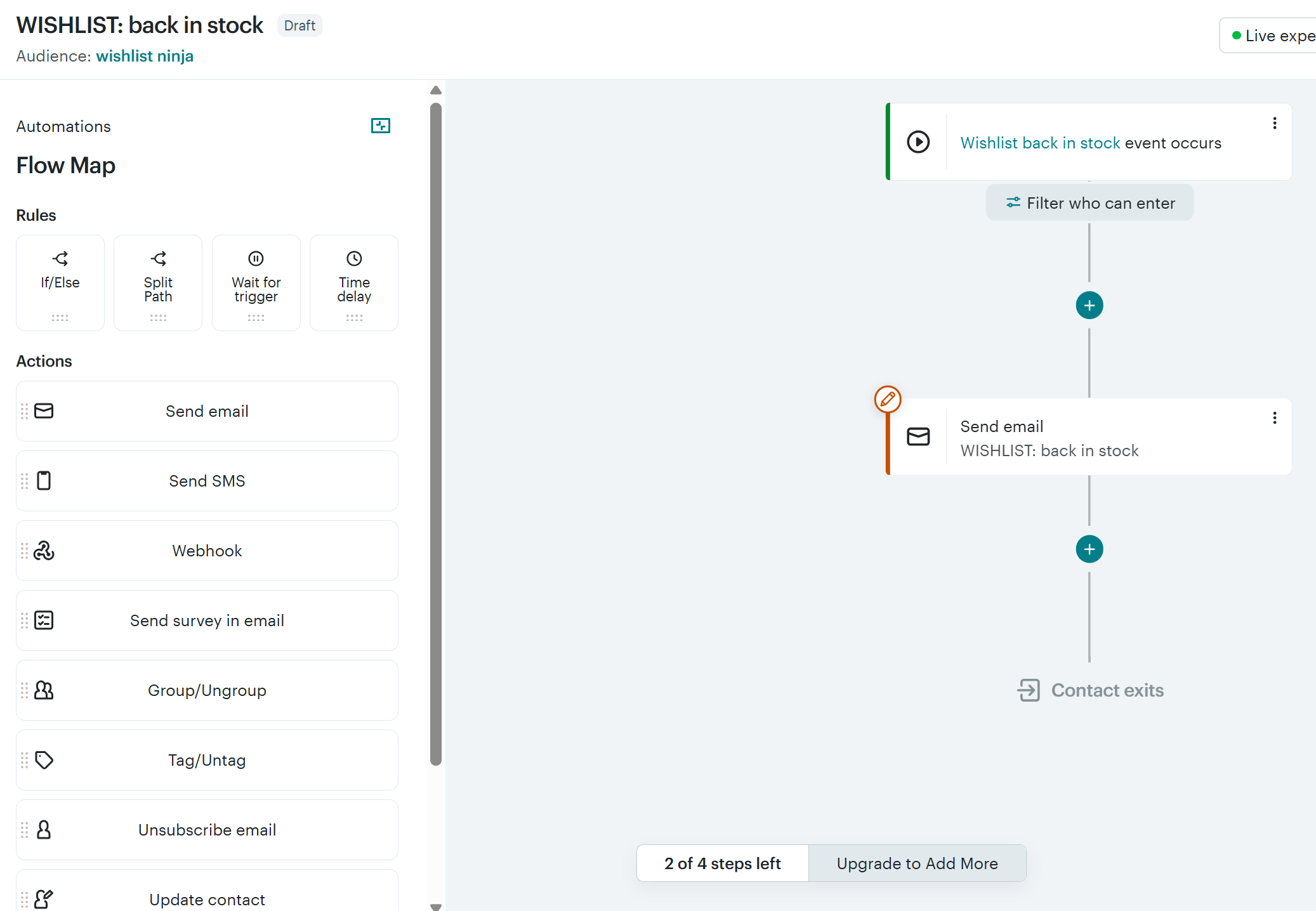
*|WL_URL|* (“See your wishlist”).
*|WL_URL|* (“See your wishlist”).
Segments & newsletter blocks
The same wishlist data powers Mailchimp segments and a personalised block in your regular newsletters — show it only to shoppers who have a wishlist:
*|IF:WL_ACTIVE=YES|*
You’ve saved *|WL_COUNT|* item(s) worth *|WL_CURR|**|WL_VALUE|*. [ button → *|WL_URL|* ]*|ELSE:|*
Found something you love? Start your wishlist…*|END:IF|*
Frequently asked questions
Does WishList Ninja integrate with Mailchimp?
What wishlist data syncs to Mailchimp?
Can Mailchimp email shoppers when a wishlisted item drops in price?
How much does the Mailchimp wishlist integration cost?
Which Shopify wishlist apps integrate with Mailchimp?
Plug your wishlist into Mailchimp.
Everything — the wishlist + live Mailchimp sync — free for 30 days, then plans from $19/mo (billed on Shopify). Cancel anytime.
Start Free Trial →